About CostX - Work & Cost Estimate
Break down and visualize your work, costs and products. CostX helps you efficiently break down work, costs and products in your projects into manageable parts and automatically aggregate them from branch to trunk. CostX...
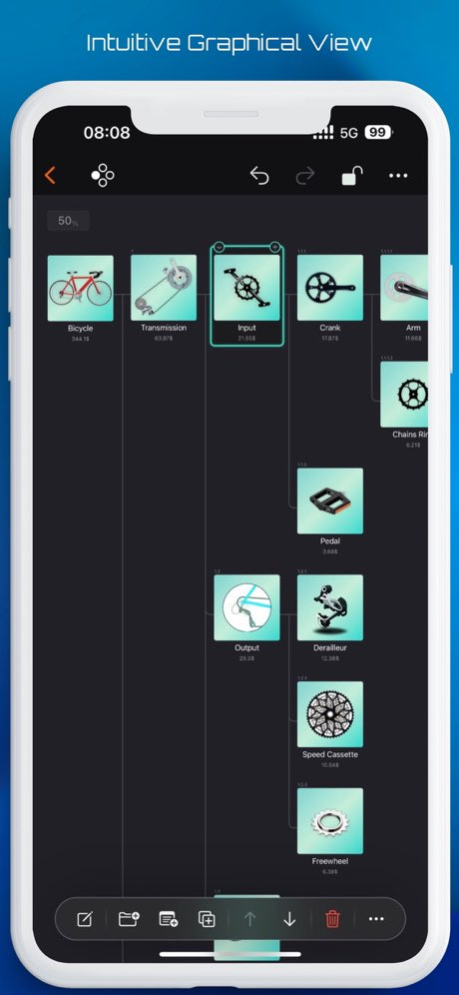
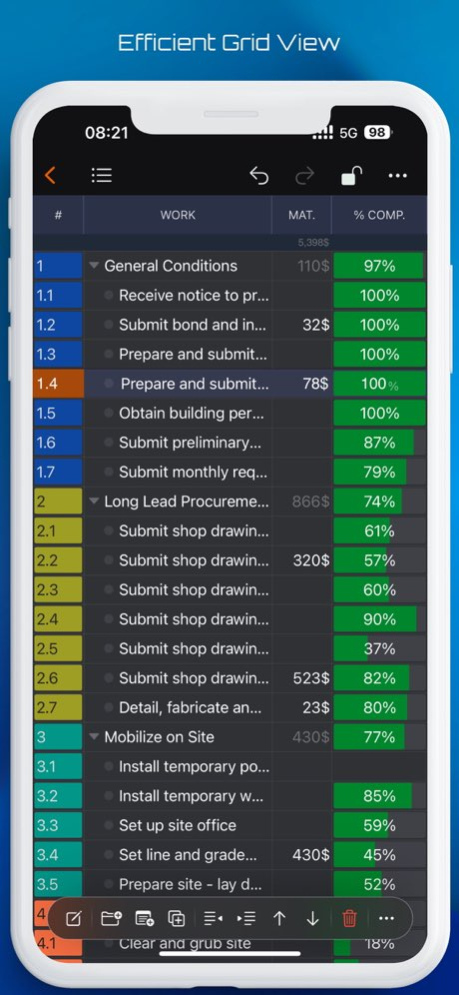
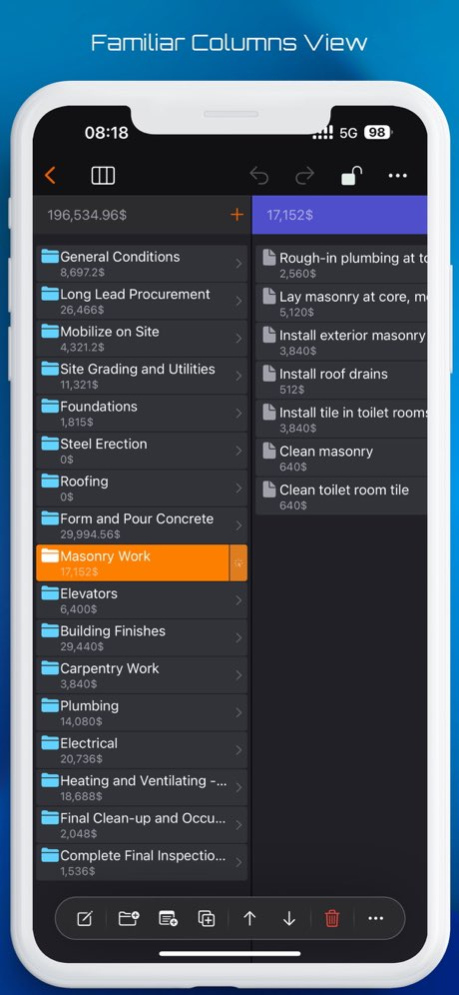
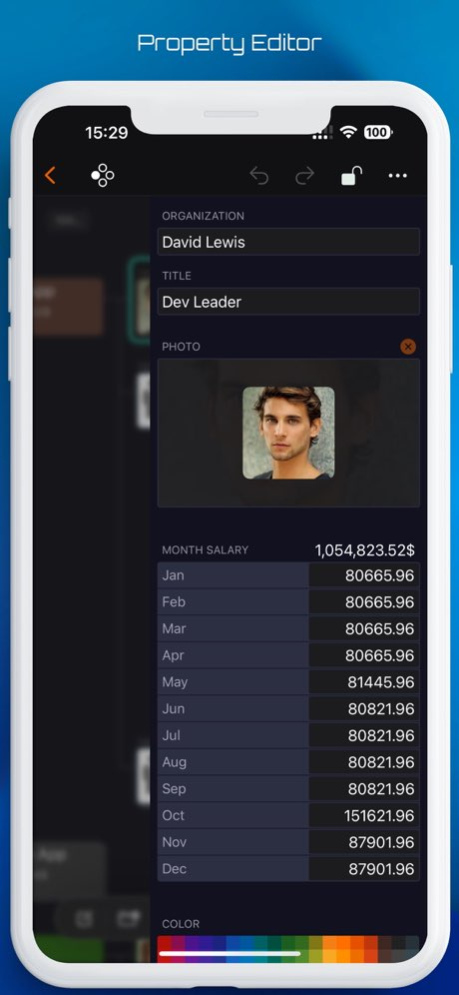
Break down and visualize your work, costs and products. CostX helps you efficiently break down work, costs and products in your projects into manageable parts and automatically aggregate them from branch to trunk. CostX can be used to create Work Breakdown Structures (WBS), Cost Breakdown Structures (CBS) and Product Breakdown Structures (PBS) and is suitable for a wide range of applications thanks to its powerful customization capabilities. CostX makes it easy and convenient to break down objects to create tree structures and provides multiple forms of views to visualize your work. Thus, you have the freedom to display your project data in graphical, list and columns views, depending on your needs - CostX makes your work more efficient and intuitive. With carefully designed data entry, CostX gives you intuitive graphical manipulations, professional table manipulations, and familiar column manipulations in data entry to break down and create nodes, change attributes, and summarize costs. costX makes these tasks much easier than you might think, with minimal operating and learning costs. The application takes advantage of the powerful interactive capabilities offered by the system, helping you share information with the system and other applications extremely efficiently. By dragging and dropping, as well as copying and pasting, you can convert multiple lines of text into multiple nodes and build a tree structure in a single step, or create nodes with multiple information fields in bulk. In addition, you can batch copy data from multiple cells in Apple Number and MS Excel to the CostX spreadsheet. CostX’s customization options allow you to better adapt the program to your business needs and get creative. Users can customize the attribute fields they want, the display order, and how nodes are displayed in the various views as needed. More freedom leads to more usage scenarios. ## Ease of use - Multiple views for viewing and editing, you can choose the most suitable one for your needs. - Graphical view, allowing you to view and edit nodes in an intuitive way. - List view, with detailed data display and table editing that supports continuous input and switching and modifying cells. - Columns view, for convenient and familiar operation, similar to the columns view of the file application. - Property editor, maintenance of all properties of the node for changes. - Convenient operation of adding, duplicating, folding and indenting. ## Efficient - Powerful drag-and-drop support for: - Move and copy nodes within a document. - Merge costs within a document. - Drop CostX files into a node to insert its contents. - Drag images from Files app, Photos app, and Web browser. - Powerful copy and paste support. - Copy and paste within a document and between multiple documents. - Nodes - Cells - Copy text from outside: - Single-line text to create a new node. - Multiline text to create multiple nodes in series and get tree structure information. - Modify cell contents. - Copy data from Apple Number and Microsoft Excel: - Change cell contents in batch at once. - Batch add nodes with multiple fields at once. ## Customization - Base currency, cost rate and category settings. - More than fifty fields to choose from, including category, photo, simple and compound cost, text, date, percentage complete, etc. Costs can also be divided into two groups for comparison purposes. - Field settings. - Visibility in each view and in the property editor. - Field display title. - Field display width in the list view. - Field display order. - Display style of nodes in graphical view and columns view. - Use any CostX document as a template. ## Import & Export - Export the selected node as a CostX file. - SwiftApps WBS file into a CostX document. - CSV export. Terms of Use: https://www.apple.com/legal/internet-services/itunes/dev/stdeula/
Version History What’s New in This Version: - Enhanced the toolbar display for a more streamlined and intuitive user experience. - Improved the Finder view with adjusted layout for better navigation and usability. 5.5 12/19/2024 This version improves compatibility with iOS 18.0 and later, enhancing performance and stability on the latest devices. 5.2 11/05/2024 This release resolves the issue that prevented the wizard from appearing at startup. 5.1 04/17/2024 CostX 5.0 introduces PDF and Image export features. Now, you can easily convert and save your projects for printing or as files, enhancing your productivity and project documentation. We're dedicated to improving CostX to serve your evolving needs better. Stay connected for more updates! 5.0 04/08/2024 We made improvements and squashed bugs so CostX is even better for you. 4.5 01/19/2024 We are always striving to improve CostX and make it the best app for managing your costs by breaking down work, cost and product into manageable components. In this update, we have added some new features and enhancements that we hope you will find useful. - Hide group cost value by field settings: You can now hide the group cost value by adjusting the field settings in the document window. - Tiny updates on menu icons: We have updated some of the menu icons to make them more consistent and intuitive. - Image drag and drop enhancement: We have enhanced the image drag and drop feature to make it easier for you to add images to your document. 4.3 11/01/2023 We are always striving to improve CostX and make it the best app for managing your costs by breakdown work, cost and product to manageable components. In this update, we have enhanced the toolbar to use the new features and match the styles of the system. - Toolbar enhancements: We have improved the toolbar to make it more convenient and intuitive for you to use CostX and its new features, and the toolbar also matches the styles of the newly released system. - Performance and stability improvements. We have fixed some bugs and improved the performance and stability of the app. 4.2 09/24/2023 We have updated CostX to make it compatible with iOS 17. CostX 4.1 works well with iOS 17, the latest version of Apple’s operating system for iPhone and iPad. You can use CostX to manage your costs of work, project and products while enjoying the new features and improvements of iOS 17. 4.1 09/22/2023 We are always striving to improve CostX and make it the best app for managing your costs. In this update, we have added a new feature that will make it easier for you to import data and settings from other apps. - Import Wizard: You can now import data and settings from QuickPlan projects and WBS files to a new CostX document. You can then use CostX’s powerful features to manage your expenses and income, create budgets, generate reports, and sync your data across all your devices. https://costd.mbl.app/blog/release4_0 4.0 09/10/2023 We are always striving to improve CostX and make it the best app for breaking cost down. In this update, we have added some new features and enhancements that we hope you will enjoy. ## Export by category: You can now export a subset of your data based on the categories you select. This is useful if you want to focus on specific areas of your spending or income, or share your data with others. To use this feature, tap on the export button and choose the categories you want to include in the new document. ## UI enhancements: We have made some minor adjustments to the main document window, the news section, and other parts of the app to make them more user friendly and aesthetically pleasing. As always, thank you for using CostX and supporting our development. If you have any feedback or suggestions, please contact us https://costx.mbl.app/contactus/. We appreciate your input and we are always listening. 3.0 08/21/2023 We update CostX as often as possible to make it faster and more reliable for you. Here are some of the improvements you will find in the latest update: - Introducing a new search user interface that allows you to find nodes by selecting a field. This feature enhances your ability to search and locate information quickly and efficiently. - We've also made enhancements to the user settings, providing you with more options to customize your experience and tailor CostX to your preferences. 2.2 08/12/2023 We are always striving to make CostX better for you and your productivity. What's new: - Enhanced the document setting user interface for more clarity and ease of use. - Streamlined CSV exporting user interface for faster and smoother data transfer. - Fixed minor bugs to improve performance and stability. Download CostX 2.1 now and discover how these new features can boost your creativity and efficiency! 2.1 06/05/2023 We are constantly working to improve CostX to provide you with the best user experience possible. What's new: New document creation wizards. Select the fields used in your Work Breakdown Structure (WBS), Cost Breakdown Structure (CBS), and Product Breakdown Structure (PBS) documents by following our easy-to-use wizards. Try CostX 2.0 today and see how these new features help you work more creatively and efficiently! 2.0 04/28/2023 We are committed to constantly improving our app to give you the best experience possible. With version 1.3, we have significantly improved the document settings and the ChatGPT-Assistant bulk node creation feature to give you even more control, flexibility and efficiency when creating your project documents. What's New: - Improved document settings for even easier customization of your project documents - ChatGPT- Assistant bulk node creation feature is now even more creative and efficient, allowing for flexible WBS, CBS, and PBS creation Try out CostX 1.3 today and discover how our app can help you work more creatively and efficiently. 1.3 04/17/2023 CostX is continuously improved - version 1.2 contains improved document settings and bug fixes What is New: - The user interface for setting the visibility and title of cost fields in documents has been redesigned for better usability - Some minor bugs have been fixed to improve the stability of the app We are constantly working to improve our app and provide you with the best possible experience. 1.2 03/19/2023 CostX App Version 1.1 Update - Bug Fixes and Performance Improvements What's New: - Fixed a few minor bugs to improve the stability of the app - Improved the overall performance of the app for a better user experience We are constantly working to enhance your experience with CostX. Keep your app updated to ensure you're enjoying the latest features and improvements. Thank you for choosing CostX! 1.1 03/09/2023 1.0 03/07/2023
Previous Versions
Here you can find the changelog of CostX - Work & Cost Estimate since it was posted on our website on 2024-11-16 19:41:47.
The latest version is 5.5 and it was updated on 2026-10-07 07:35:12. See below the changes in each version.
CostX - Work & Cost Estimate version 5.5
Updated At: 2026-10-06
Changes: Version History What’s New in This Version:
- Enhanced the toolbar display for a more streamlined and intuitive user experience.
- Improved the Finder view with adjusted layout for better navigation and usability. 5.5 12/19/2024 This version improves compatibility with iOS 18.0 and later, enhancing performance and stability on the latest devices. 5.2 11/05/2024 This release resolves the issue that prevented the wizard from appearing at startup. 5.1 04/17/2024 CostX 5.0 introduces PDF and Image export features. Now, you can easily convert and save your projects for printing or as files, enhancing your productivity and project documentation. We're dedicated to improving CostX to serve your evolving needs better. Stay connected for more updates! 5.0 04/08/2024 We made improvements and squashed bugs so CostX is even better for you. 4.5 01/19/2024 We are always striving to improve CostX and make it the best app for managing your costs by breaking down work, cost and product into manageable components. In this update, we have added some new features and enhancements that we hope you will find useful.
- Hide group cost value by field settings: You can now hide the group cost value by adjusting the field settings in the document window.
- Tiny updates on menu icons: We have updated some of the menu icons to make them more consistent and intuitive.
- Image drag and drop enhancement: We have enhanced the image drag and drop feature to make it easier for you to add images to your document. 4.3 11/01/2023 We are always striving to improve CostX and make it the best app for managing your costs by breakdown work, cost and product to manageable components. In this update, we have enhanced the toolbar to use the new features and match the styles of the system.
- Toolbar enhancements:
We have improved the toolbar to make it more convenient and intuitive for you to use CostX and its new features, and the toolbar also matches the styles of the newly released system.
- Performance and stability improvements.
We have fixed some bugs and improved the performance and stability of the app. 4.2 09/24/2023 We have updated CostX to make it compatible with iOS 17. CostX 4.1 works well with iOS 17, the latest version of Apple’s operating system for iPhone and iPad. You can use CostX to manage your costs of work, project and products while enjoying the new features and improvements of iOS 17. 4.1 09/22/2023 We are always striving to improve CostX and make it the best app for managing your costs. In this update, we have added a new feature that will make it easier for you to import data and settings from other apps.
- Import Wizard: You can now import data and settings from QuickPlan projects and WBS files to a new CostX document.
You can then use CostX’s powerful features to manage your expenses and income, create budgets, generate reports, and sync your data across all your devices.
https://costd.mbl.app/blog/release4_0 4.0 09/10/2023 We are always striving to improve CostX and make it the best app for breaking cost down. In this update, we have added some new features and enhancements that we hope you will enjoy.
## Export by category:
You can now export a subset of your data based on the categories you select. This is useful if you want to focus on specific areas of your spending or income, or share your data with others. To use this feature, tap on the export button and choose the categories you want to include in the new document.
## UI enhancements:
We have made some minor adjustments to the main document window, the news section, and other parts of the app to make them more user friendly and aesthetically pleasing.
As always, thank you for using CostX and supporting our development. If you have any feedback or suggestions, please contact us https://costx.mbl.app/contactus/. We appreciate your input and we are always listening. 3.0 08/21/2023 We update CostX as often as possible to make it faster and more reliable for you. Here are some of the improvements you will find in the latest update:
- Introducing a new search user interface that allows you to find nodes by selecting a field. This feature enhances your ability to search and locate information quickly and efficiently.
- We've also made enhancements to the user settings, providing you with more options to customize your experience and tailor CostX to your preferences. 2.2 08/12/2023 We are always striving to make CostX better for you and your productivity.
What's new:
- Enhanced the document setting user interface for more clarity and ease of use.
- Streamlined CSV exporting user interface for faster and smoother data transfer.
- Fixed minor bugs to improve performance and stability.
Download CostX 2.1 now and discover how these new features can boost your creativity and efficiency! 2.1 06/05/2023 We are constantly working to improve CostX to provide you with the best user experience possible.
What's new:
New document creation wizards. Select the fields used in your Work Breakdown Structure (WBS), Cost Breakdown Structure (CBS), and Product Breakdown Structure (PBS) documents by following our easy-to-use wizards.
Try CostX 2.0 today and see how these new features help you work more creatively and efficiently! 2.0 04/28/2023 We are committed to constantly improving our app to give you the best experience possible. With version 1.3, we have significantly improved the document settings and the ChatGPT-Assistant bulk node creation feature to give you even more control, flexibility and efficiency when creating your project documents.
What's New:
- Improved document settings for even easier customization of your project documents
- ChatGPT- Assistant bulk node creation feature is now even more creative and efficient, allowing for flexible WBS, CBS, and PBS creation
Try out CostX 1.3 today and discover how our app can help you work more creatively and efficiently. 1.3 04/17/2023 CostX is continuously improved - version 1.2 contains improved document settings and bug fixes
What is New:
- The user interface for setting the visibility and title of cost fields in documents has been redesigned for better usability
- Some minor bugs have been fixed to improve the stability of the app
We are constantly working to improve our app and provide you with the best possible experience. 1.2 03/19/2023 CostX App Version 1.1 Update - Bug Fixes and Performance Improvements
What's New:
- Fixed a few minor bugs to improve the stability of the app
- Improved the overall performance of the app for a better user experience
We are constantly working to enhance your experience with CostX. Keep your app updated to ensure you're enjoying the latest features and improvements.
Thank you for choosing CostX! 1.1 03/09/2023 1.0 03/07/2023
CostX - Work & Cost Estimate version 5.5
Updated At: 2024-12-19
Changes: What’s New in This Version:
- Enhanced the toolbar display for a more streamlined and intuitive user experience.
- Improved the Finder view with adjusted layout for better navigation and usability.
CostX - Work & Cost Estimate version 5.5
Updated At: 2024-12-19
Changes: Dec 19, 2024
Version 5.5
This version improves the display of the document toolbar for a better user experience.
CostX - Work & Cost Estimate version 5.0
Updated At: 2024-04-08
Changes: Apr 8, 2024
Version 5.0
CostX 5.0 introduces PDF and Image export features. Now, you can easily convert and save your projects for printing or as files, enhancing your productivity and project documentation. We're dedicated to improving CostX to serve your evolving needs better. Stay connected for more updates!
Disclaimer
Official App Store Link
We do not host CostX - Work & Cost Estimate on our servers. We did not scan it for viruses, adware, spyware or other type of malware. This app is hosted by Apple and passed their terms and conditions to be listed there. We recommend caution when installing it.
The App Store link for CostX - Work & Cost Estimate is provided to you by apps112.com without any warranties, representations or guarantees of any kind, so access it at your own risk.
If you have questions regarding this particular app contact the publisher directly. For questions about the functionalities of apps112.com contact us.